Serial monitor · protocol workbench · Windows
See every byte.
Understand every packet.
Plug in a LoRa radio, a Meshtastic node, an ESP32 or anything on a COM port. IOIHAN Serial shows what your devices are saying, live and in colour, including the control characters other tools hide. Watch several at once, catch what matters, and answer back.
- One signed .exe
- Nothing to install
- $39 once
- Never phones home
I (13556) app: temp=22.6C hum=41%
I (13949) matter: commissioning window open
W (14518) ota: no update available
I (15685) wifi: connected, rssi -61
D (16373) ble: adv started, interval 100ms
E (16910) i2c: sensor timeout, retrying
esp32> ▍
If it talks over a COM port, IOIHAN Serial can watch it.
- LoRa radios
- Meshtastic & MeshCore nodes
- ESP32 & Arduino boards
- Matter devices
- CP210x, CH340, FTDI, PL2303 adapters
- STX/ETX instruments & POS gear
Five ways to read a byte
Stop guessing what’s in the stream.
Protocols live in the bytes you can’t see: the STX that starts a frame, the US between fields, the NAK that says try again. IOIHAN Serial names every one and colours it by what it does. Switch views any time; the data never changes, only how you look at it.
Try it: pick a mode.
SIM-NODE7 RX{STX}N07{ACK}SEQ=0002{US}T=22.3{ETX}B
Expanded: Every control byte named and coloured by what it does: framing, separators, ACK and NAK.
The workspace
Your whole bench on one screen.
Ports on the left, each with live RX/TX lights and a traffic graph. Monitors in the middle, each fed by the ports you drop on it. Every action on a hotbar with its key, so your hands stay on the keyboard.
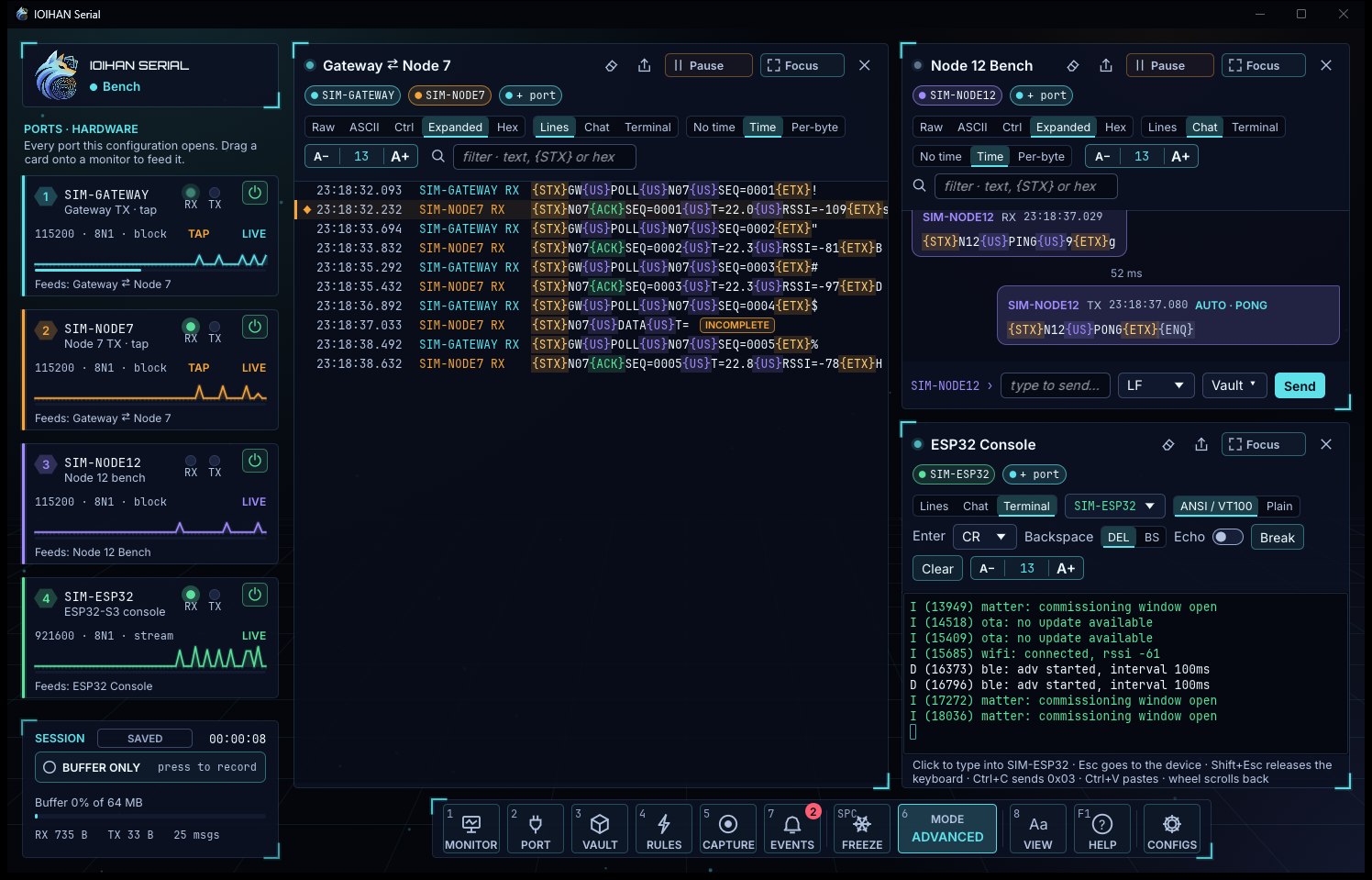
- 1Port roster. Live, idle or offline at a glance; release a port with its power button.
- 2Lines view. Timestamps, ports in colour, control bytes named, trigger hits marked.
- 3Chat view. A conversation between devices, with the gap between each message.
- 4Terminal view. Type straight into a device console, with full ANSI colour.
Inspect
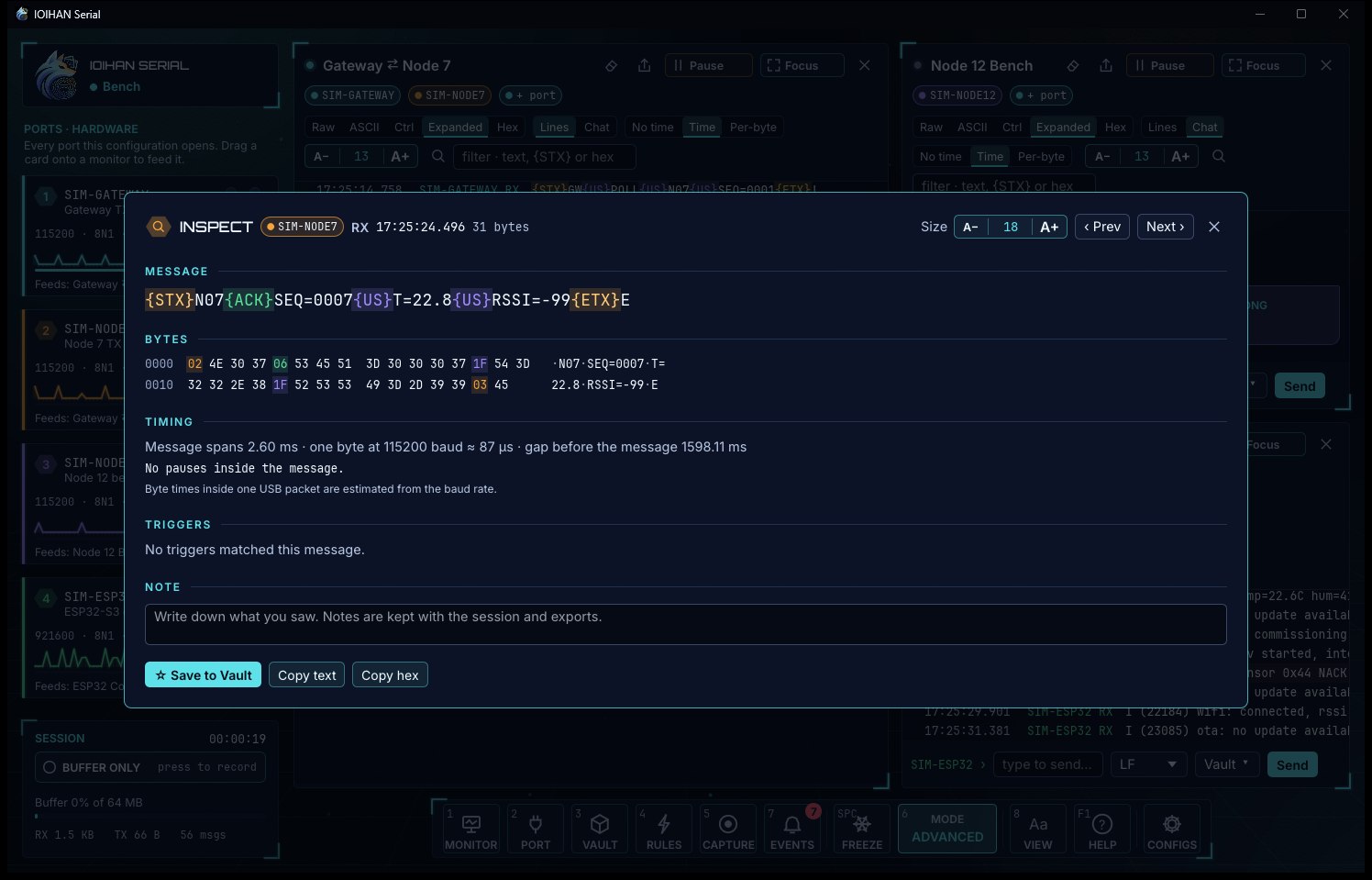
Click any message. See all of it.
Double-click a line and the Inspector opens it large: every control byte named, a full hex dump, how long it took on the wire, the gap before it, and which triggers it set off. Step through messages with Prev and Next, add a note, or save it to the Vault.
- Hex and text side by side, offsets included
- Timing from the baud rate and the real arrival times
- Notes stay with the session and its exports
Spot it · Answer it
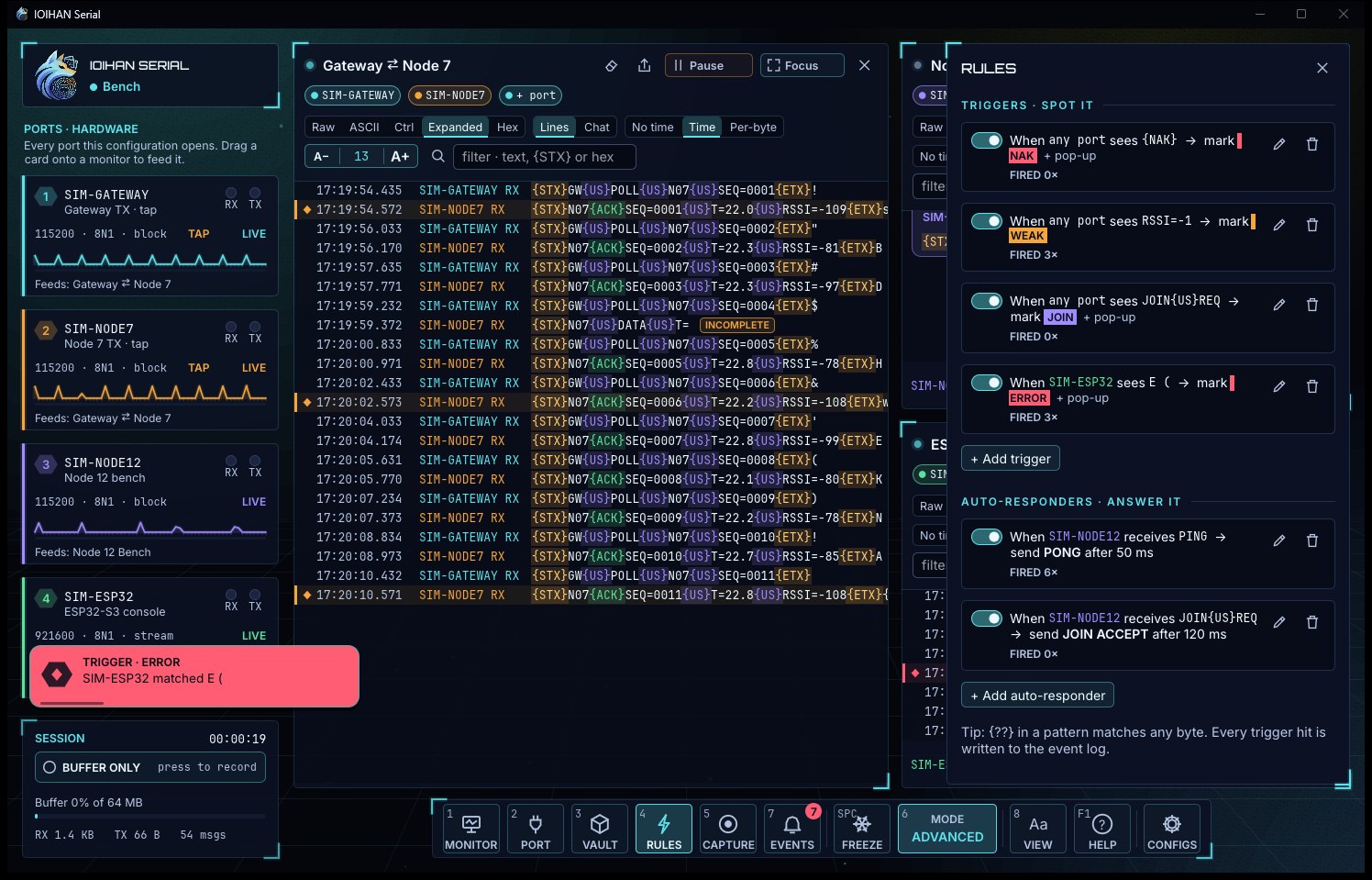
Triggers catch it. Auto-responders answer it.
Tell IOIHAN Serial what matters: “when any port sees {NAK}, mark it red and pop up.” Then let it play the other side of the conversation: “when Node 12 receives PING, send PONG after 50 ms.” Perfect for testing a device before the real partner exists.
- Patterns in plain text, {STX} names or hex, with {??} wildcards
- Every hit is marked in the view and kept in the event log
- Responders keep answering even while the window is minimised
Packet Vault
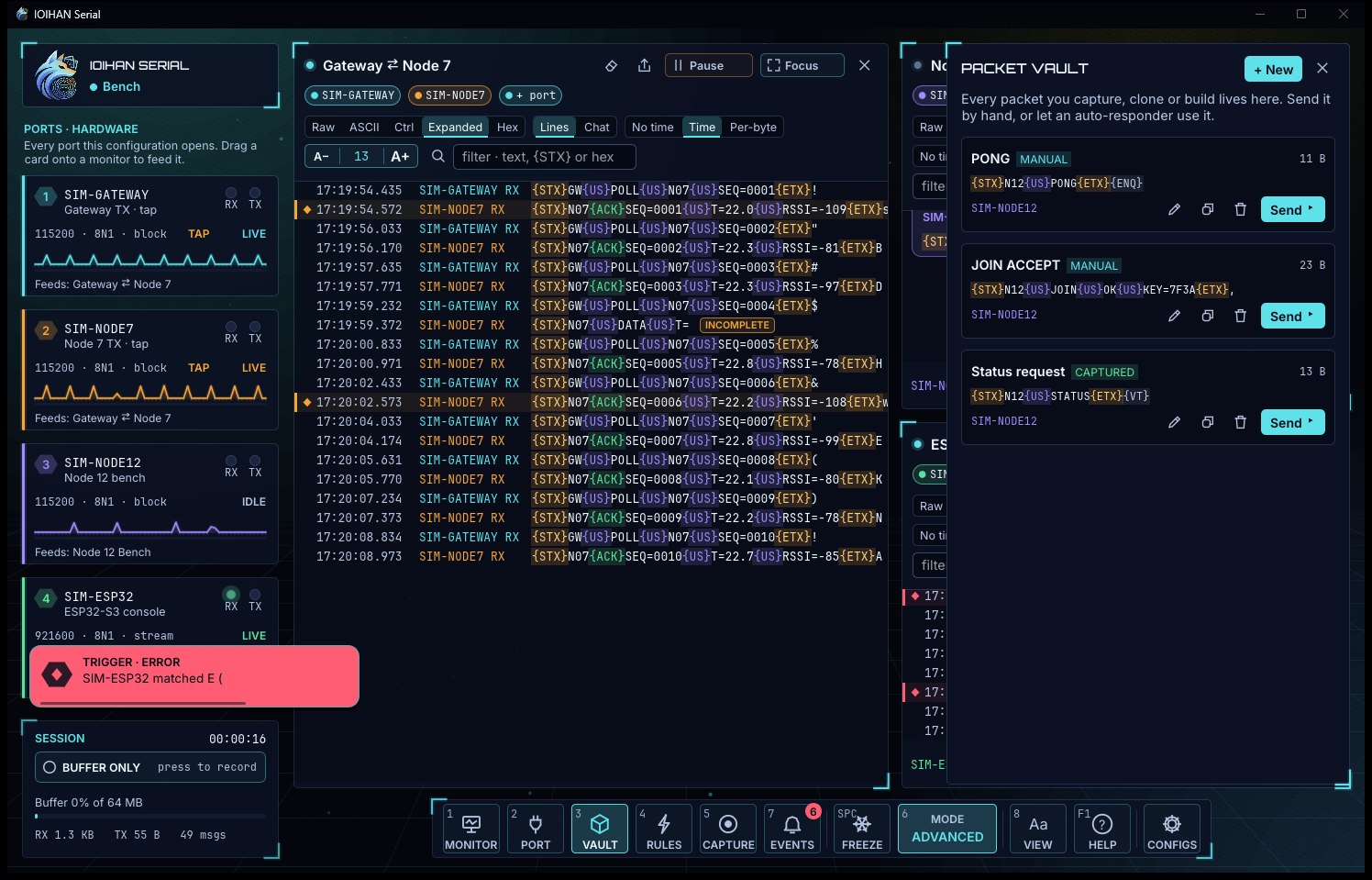
Capture it once. Replay it forever.
Save any message you see, clone it, edit it as text or hex, and send it again with one click. The Vault holds the packets you need on the bench every day, and your auto-responders can use them too.
- Captured, manual and cloned packets in one place
- Edit in {STX} syntax or raw hex; checksums in Advanced mode
- Send to any port that isn’t listen-only
Terminal
A real terminal, right next to your monitors.
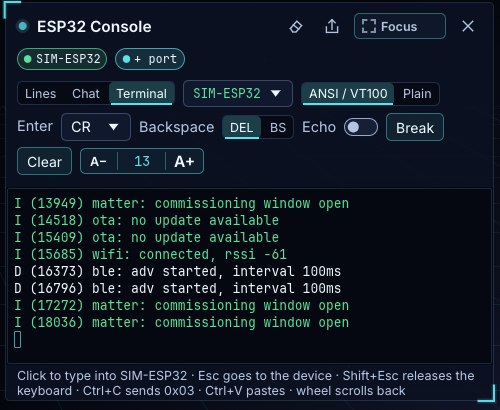
Switch any monitor to Terminal and type straight into an ESP-IDF, Zephyr or Linux console. ANSI and VT100 colours and cursor control, Enter as CR, LF or both, Backspace as DEL or BS, local echo and Break, all in the same window as the rest of your bench.
- Ctrl+C sends 0x03; Esc goes to the device; Shift+Esc gives the keyboard back
- Plain mode shows the escape codes themselves, for debugging the console
- Your other monitors keep watching while you type
And the rest of the toolkit
Built by someone who lives at the bench.
Many ports, one screen
Real COM ports and USB serial devices side by side, or merged into one conversation. Each port keeps its own colour everywhere.
Stream or block framing
Line-based logs or STX/ETX blocks with trailing checksums. Incomplete blocks are flagged, never silently glued together.
Timing that tells the story
Wall-clock or relative timestamps, gaps between messages, and per-byte timing to find the pause that broke the protocol.
Capture to disk
Record every raw byte with its time, from every port, while you keep working. Export any view as text.
Freeze without losing a byte
Pause one monitor or freeze them all. Capture keeps running and shows you what’s waiting.
Watch a busy port
Another program has the port? For USB serial adapters, IOIHAN Serial can listen in through the free USBPcap driver, both directions.
Release with one click
Hand a port to the flashing tool or IDE, then take it back. Shift+D releases them all.
Simulated devices built in
A LoRa gateway, two nodes and an ESP32 console, ready to go, so you can learn every feature before plugging anything in.
Why switch
More than a terminal. Less than a lab.
Terminals are great for typing. Logic analysers are great for voltages. IOIHAN Serial is for the part in between: what your devices actually said, when, and why it went wrong.
PuTTY and plain terminals
- One port per window
- Control bytes are invisible or garbled
- No capture, replay or auto-answer
- Great for typing commands
Arduino Serial Monitor
- Tied to the IDE and one board
- Closes while you upload
- Text only, no hex or timing
- Great for quick prints
IOIHAN Serial
- Every port at once, in colour
- Every control byte named
- Inspect, capture, replay, auto-answer
- A full terminal included
No hardware? No problem.
A simulated bench, one keypress away.
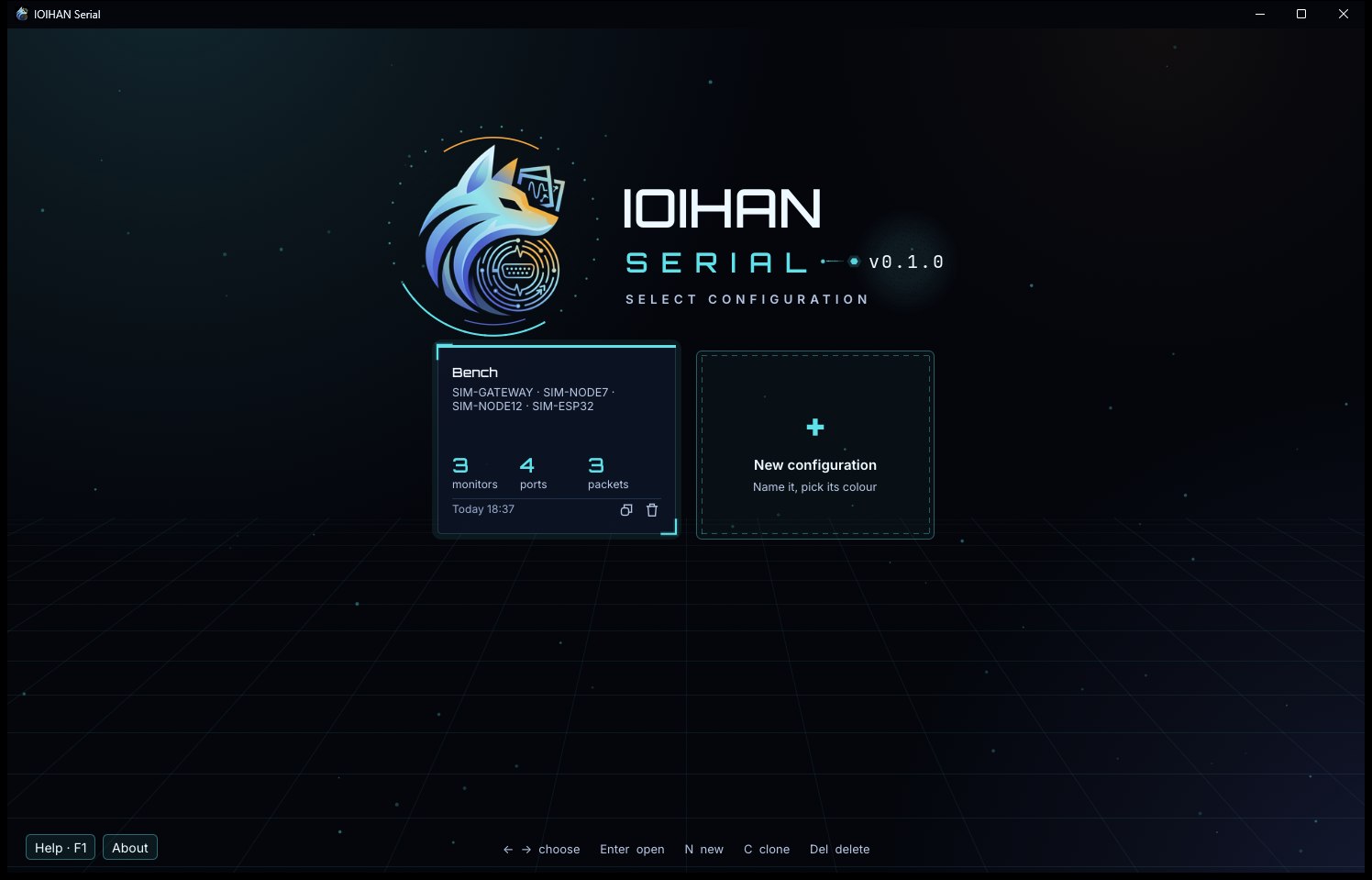
Create a configuration with the simulated LoRa bench and you get a gateway, two nodes and an ESP32 console, talking in real STX/ETX frames and ESP-IDF logs. Learn every feature, build your rules and packets, then swap in the real ports.
Every setup is saved as a configuration with its own colour, so the bench for each project reopens exactly as you left it.
Pricing
One tool. One price.
$39once, per person
- Every feature, no tiers, no subscription
- Use it on every PC you work on, or carry it on a USB stick
- One signed program file, nothing to install
- Updates as they come, support by email
- 30-day refund if it doesn’t work for you
FINAL TESTING
Be first on the bench.
IOIHAN Serial is in final testing on real hardware. Leave your email and we’ll tell you the moment it’s ready to download.
FAQ
Questions, answered.
What is IOIHAN Serial?
A serial monitor and protocol workbench for Windows. It watches the traffic on COM ports and USB serial adapters, shows it clearly (including the control characters most tools hide), and lets you inspect, capture, replay and automatically answer messages, across several devices at once.
Is it a PuTTY alternative?
For serial work, yes. Any monitor can switch to a Terminal view with ANSI/VT100 colours, cursor control, Break and local echo, so you can type into a device console as you would in PuTTY. Unlike PuTTY, it can also watch other ports at the same time, show every byte, and capture and replay traffic. It doesn’t do SSH or Telnet.
Can it replace the Arduino Serial Monitor?
Yes, and it doesn’t have to close when you upload: release the port with one click, upload from the IDE, then reconnect. You also get hex, timing, colours per board, filters and triggers.
Can I watch a COM port that another program already has open?
Windows lets only one program open a COM port. For USB serial adapters (CDC, CP210x, CH340/CH9102, FTDI and PL2303), IOIHAN Serial can listen in through USBPcap, a free USB capture driver, and show both directions without disturbing the program that owns the port. Windows asks for your approval each time it starts. For built-in or PCI serial ports, use a hardware tap cable.
Which devices does it work with?
Anything that shows up as a COM port: LoRa radios, Meshtastic and MeshCore nodes, ESP32, nRF52 and Arduino boards, Matter development kits, USB-to-serial adapters, and STX/ETX instruments and terminals. Baud rates from 300 to 2,000,000 are listed, with data bits, parity, stop bits, flow control, DTR and RTS.
Does it decode Meshtastic or MeshCore packets?
Today it shows their serial traffic clearly with framing, hex and timing. Dedicated Meshtastic and MeshCore decoders are planned for a coming version.
Do I need to install anything?
No. IOIHAN Serial is one signed program file. Copy it onto the laptop or bench PC where you need it and run it; its settings and captures are kept in a folder next to it. Only the optional busy-port feature needs the free USBPcap driver.
What does it cost?
A one-time $39 per person, no subscription. Use it on any computers you work on. If it doesn’t work for you, email us within 30 days for a full refund.
Does it send my data anywhere?
No. IOIHAN Serial never connects to the internet. No account, no analytics, no telemetry. Your traffic, captures and configurations stay on your computer.
What does it run on?
Windows 10 or 11 (64-bit). Windows SmartScreen may ask about a new program; check that the publisher is IOIHAN, LLC before choosing Run anyway.